So when I building password manger. I want to build a password generator my main requirements as follows:
- Generates a random password based on user-defined criteria (length, character types).
- Calculates password strength based on character types and length.
- Provides visual feedback on password strength using a color-coded bar.
- Allows users to copy the generated password.
Design:
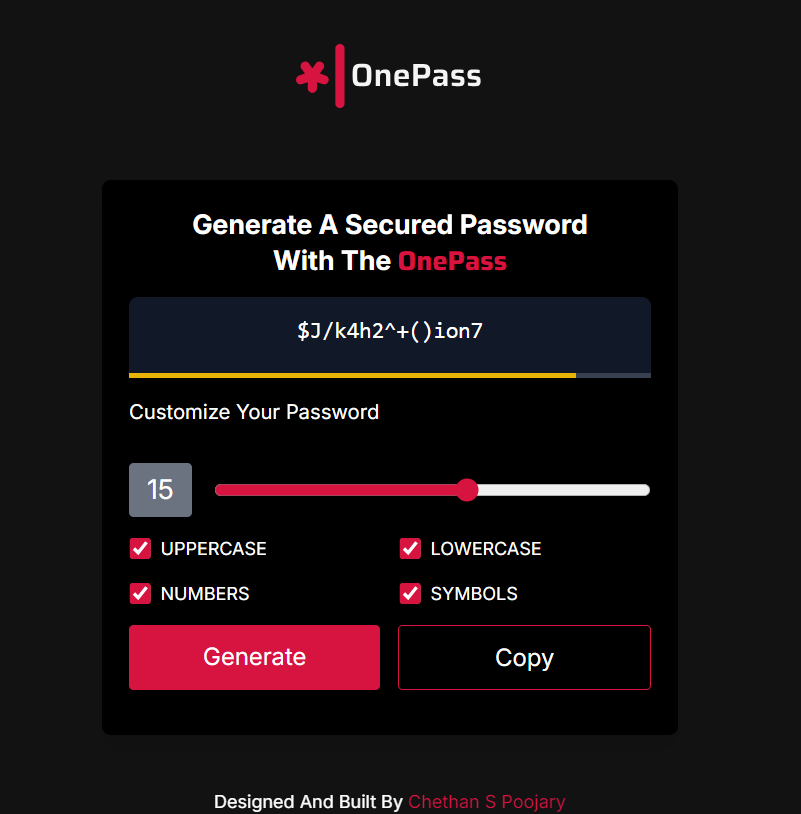
Logical Break Down:
- External package I used for this component
import React, { useEffect, useState } from 'react';
import clsx from 'clsx';
import Button from '../components/Button';
Here clsx is used combine class name logically.
Component start
const GeneratePass: React.FC = () => {Creating state variables
    const [password, setPassword] = useState('');
    const [length, setLength] = useState(15);
    const [strength, setStrength] = useState(6);
    const [errorMessage, setErrorMessage] = useState('');
    const [coped, setCoped] = useState(false);
    const [options, setOptions] = useState({
        uppercase: true,
        lowercase: true,
        numbers: true,
        symbols: true,
    });
Creating Generate password function
    const generatePassword = () => {
        if (!isAnyOptionSelected()) {
            setPassword("");
            setStrength(3)
            setErrorMessage('Please select at least one option.');
            return;
        }

        setErrorMessage(''); // Clear error message if everything is fine

        const { uppercase, lowercase, numbers, symbols } = options;
        const upperChars = 'ABCDEFGHIJKLMNOPQRSTUVWXYZ';
        const lowerChars = 'abcdefghijklmnopqrstuvwxyz';
        const numberChars = '0123456789';
        const symbolChars = '!@$%^()_+?,/';

        let availableChars = '';
        if (uppercase) availableChars += upperChars;
        if (lowercase) availableChars += lowerChars;
        if (numbers) availableChars += numberChars;
        if (symbols) availableChars += symbolChars;

        let generatedPassword = '';
        for (let i = 0; i < length; i++) {
            const randomIndex = Math.floor(Math.random() * availableChars.length);
            generatedPassword += availableChars[randomIndex];
        }

        setPassword(generatedPassword);
        calculateStrength(generatedPassword);
    };
Creating strength checker function
    const calculateStrength = (password: string) => {
        let score = 0;

        if (/[A-Z]/.test(password)) score += 1;
        if (/[a-z]/.test(password)) score += 1;
        if (/[0-9]/.test(password)) score += 1;
        if (/[^A-Za-z0-9]/.test(password)) score += 1;
        if (password.length >= 8) score += 1;
        if (password.length >= 12) score += 1;
        if (password.length >= 16) score += 1;

        setStrength(score);
    };
Creating function validate user selected any option or not. return true or false
    const isAnyOptionSelected = () => {
        return Object.values(options).some(option => option);
    };
Handling copy functionaliy
    const handleCopy = () => {
        navigator.clipboard.writeText(password);
        setCoped(true);

        setTimeout(() => {
            setCoped(false); // reset copy state false
        }, 2500);
        // alert('Password copied to clipboard');
    };
Generate Dynamic color class based on password strength
    const getStrengthBarColor = () => {
        switch (strength) {
            case 7:
                return 'bg-green-500';
            case 6:
            case 5:
                return 'bg-yellow-500';
            case 4:
            case 3:
                return 'bg-orange-500';
            default:
                return 'bg-red-500'; // Default color for very weak passwords or initial state
        }
    };
Running generate password when component load at first
useEffect(() => { generatePassword() }, [])Returning JSX:
   return (
        <div className="continer flex items-center justify-center px-4">
            <div className="p-6 bg-black rounded-lg shadow-lg text-white max-w-lg w-full">
                <h1 className="text-2xl font-bold mb-4 text-center">Generate A Secured Password<br />With The <span className="text-red font-saira">OnePass</span></h1>
                <div className="bg-gray-900 rounded-tl-lg rounded-tr-lg mb-4">
                    <p className="text-xl font-mono text-center p-4">{password || "***************"}</p>
                    <div className="h-1 mt-2  overflow-hidden bg-gray-700">
                        <div className={clsx('h-full', getStrengthBarColor())} style={{ width: `${(strength / 7) * 100}%` }}></div>
                    </div>
                </div>
                <div className="mb-4">
                    <label className="block text-lg mb-6">Customize Your Password</label>
                    <div className='flex flex-col gap-4'>
                        <div className='flex gap-5'>
                            <div className="text-center mt-2 py-2 px-4 text-2xl bg-gray-500 rounded">{length}</div>
                            <input
                                type="range"
                                min="8"
                                max="20"
                                value={length}
                                onChange={(e) => setLength(Number(e.target.value))}
                                className="w-full mt-2"
                            />
                        </div>
                    </div>
                </div>
                <div className="mb-4 grid grid-cols-2 gap-4 mb-14">
                    {Object.keys(options).map((option) => (
                        <label key={option} className="flex items-center cursor-pointer">
                            <input
                                type="checkbox"
                                checked={options[option as keyof typeof options]}
                                onChange={() =>
                                    setOptions({ ...options, [option]: !options[option as keyof typeof options] })
                                }
                                className="form-checkbox h-5 w-5 text-red-500 "
                            />
                            <span className="ml-2 uppercase font-inter">{option}</span>
                        </label>
                    ))}
                </div>
                <div className="flex gap-4">
                    <Button
                        text="Generate"
                        url="#"
                        variation="primary"  // or 'secondary' depending on your style needs
                        size="block"        // or 'block' depending on your layout
                        onClick={generatePassword}  // Pass the click event handler
                    />
                    <Button
                        text={coped ? "Coped" : "Copy"}
                        url="#"
                        variation="secondary"  // or 'secondary' depending on your style needs
                        size="block"        // or 'block' depending on your layout
                        onClick={password ? handleCopy : generatePassword}  // Pass the click event handler

                    />

                </div>
                {errorMessage && (
                    <p className="text-red text-sm mt-2">{errorMessage}</p>
                )}
            </div>
        </div>
    );
Exporting component and closing
}

export default GeneratePass;