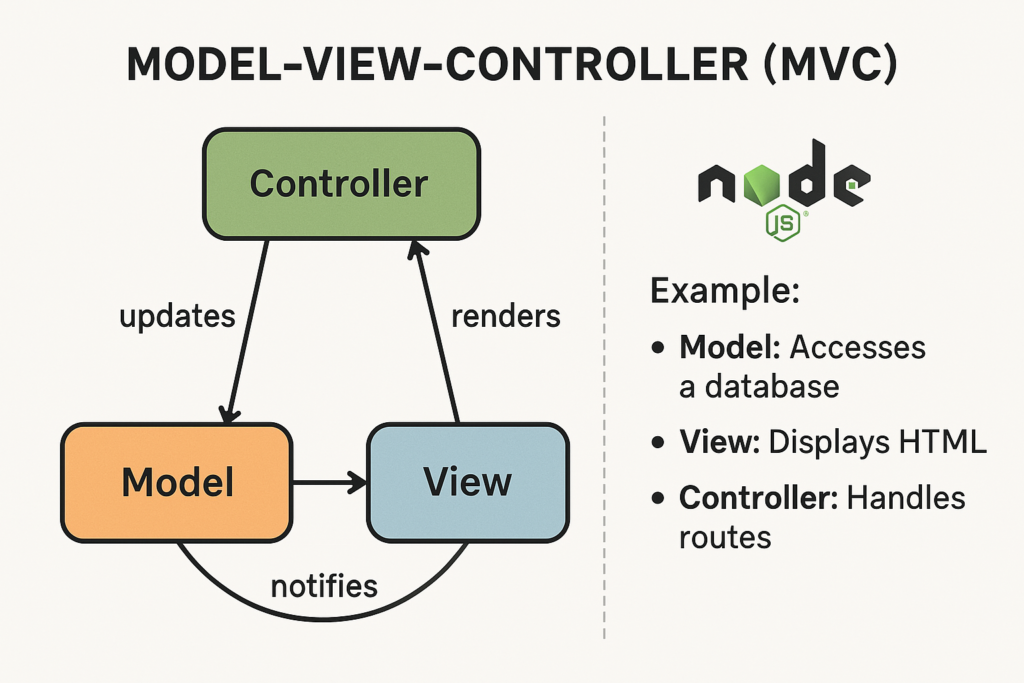
MVC (Model-View-Contoller) is a software design pattern that separates the application logic into three interconnected components:
- Model: Manages data and business logic.
- View: Handles the UI and presentation
- Controller: Act as an interface between Model and View, handling user input and coordinating actions.
MVC in a Node.js App
A typical folder structure using MVC in Node.js (with Express):
project/
│
├── models/
│   └── userModel.js
│
├── views/
│   └── userView.ejs
│
├── controllers/
│   └── userController.js
│
├── routes/
│   └── userRoutes.js
│
├── app.js
└── package.json
MVC Example
1. Model – `models/userModel.js`
Handles data (in real apps, this connects to a database like MongoDB).
// models/userModel.js
const users = [{ id: 1, name: 'Chethan' }];

exports.getAllUsers = () => users;

exports.getUserById = (id) => users.find(user => user.id === id);
2. View – `views/userView.ejs`
Displays user data.
<!-- views/userView.ejs -->
<!DOCTYPE html>
<html>
<head><title>User List</title></head>
<body>
  <h1>User List</h1>
  <ul>
    <% users.forEach(user => { %>
      <li><%= user.name %></li>
    <% }) %>
  </ul>
</body>
</html>
3. Controller – controllers/userController.js
Connect Model and View.
// controllers/userController.js
const userModel = require('../models/userModel');

exports.getUsers = (req, res) => {
  const users = userModel.getAllUsers();
  res.render('userView', { users });
};
4. Route – routes/userRoutes.js
Defines route to controller logic.
// routes/userRoutes.js
const express = require('express');
const router = express.Router();
const userController = require('../controllers/userController');

router.get('/users', userController.getUsers);

module.exports = router;
5. Main App File – app.js
Sets up the Express server.
// app.js
const express = require('express');
const app = express();
const userRoutes = require('./routes/userRoutes');

app.set('view engine', 'ejs');
app.use('/', userRoutes);

app.listen(3000, () => console.log('Server running on http://localhost:3000'));
Followinf MVC structure on your project you can write clean code by separating code and esay to maintain and testing. These are scalable for large application.