Building AI agents is the new standard for all software developers. With the rapidly evolving AI field, staying updated is essential to survive this tsunami. To keep my learning up to date, I’m studying the Google Agent Development Kit. Unfortunately, I lack working experience with Python, so I’ve started learning the Google Agent Development Kit from scratch.
Agents in ADK: Types and Implementation
In the Agent Development Kit, an agent is the fundamental building block. It’s a self-contained unit that can take in input, make decisions (sometimes with the help of an LLM), and call tools to act on behalf of a user or system. What sets ADK apart is its support for multiple types of agents, each optimized for different workflows.
Let’s explore the key agent types in ADK.
1. LLMAgent
The LlmAgent (often aliased simply as Agent) is a core component in ADK, acting as the “thinking” part of your application. It leverages the power of a Large Language Model (LLM) for reasoning, understanding natural language, making decisions, generating responses, and interacting with tools.
Unlike deterministic Workflow Agents that follow predefined execution paths, LlmAgent behavior is non-deterministic. It uses the LLM to interpret instructions and context, deciding dynamically how to proceed, which tools to use (if any), or whether to transfer control to another agent.
This makes it ideal for:
- Open-ended tasks
- Natural language user inputs
- Complex workflows with unclear structure
How It Works:
- You provide a prompt, a set of tools, and the agent uses the LLM to decide how to proceed.
- Internally, the LLM receives a “scratchpad” of previous actions and responses, enabling iterative reasoning.
Code Example:
import { FunctionTool, LlmAgent, Runner, InMemorySessionService, isFinalResponse } from '@google/adk';
import { Content } from '@google/genai';
import { z } from 'zod';

// ─── 1. Define the tool ───────────────────────────────────────────────────────
// Python uses docstrings for schema; TS uses zod + explicit description
const getWeather = new FunctionTool({
  name: 'get_weather',
  description: 'Gets the current weather for a city.',
  parameters: z.object({
    city: z.string().describe('The name of the city to get weather for.'),
  }),
  execute: ({ city }) => {
    return { result: `The weather in ${city} is sunny.` };
  },
});

// ─── 2. Create the agent ──────────────────────────────────────────────────────
const agent = new LlmAgent({
  name: 'weather_agent',
  model: 'gemini-2.0-flash',
  description: 'A helpful assistant that can check weather.',
  instruction: 'Use the get_weather tool to answer weather questions.',
  tools: [getWeather],
});

// ─── 3. Constants ─────────────────────────────────────────────────────────────
const APP_NAME  = 'weather_app';
const USER_ID   = 'user_123';
const SESSION_ID = 'session_456';

// ─── 4. Setup session + runner ────────────────────────────────────────────────
const sessionService = new InMemorySessionService();

await sessionService.createSession({
  appName: APP_NAME,
  userId: USER_ID,
  sessionId: SESSION_ID,
});

const runner = new Runner({
  agent,
  appName: APP_NAME,
  sessionService,
});

// ─── 5. Run a query ───────────────────────────────────────────────────────────
async function runQuery(query: string): Promise<string> {
  const newMessage: Content = {
    role: 'user',
    parts: [{ text: query }],
  };

  // runAsync returns an async generator — equivalent to Python's runner.run()
  for await (const event of runner.runAsync({
    userId: USER_ID,
    sessionId: SESSION_ID,
    newMessage,
  })) {
    if (isFinalResponse(event)) {
      return event.content?.parts?.[0]?.text ?? 'No text in response.';
    }
  }

  return 'No response received.';
}

// ─── 6. Example usage ─────────────────────────────────────────────────────────
const response = await runQuery("What's the weather like in Berlin?");
console.log(response);
2. SequentialAgent
A SequentialAgent is a rule-based agent that executes tools in a specific order. There’s no decision-making involved – it simply runs step-by-step through a predefined sequence.
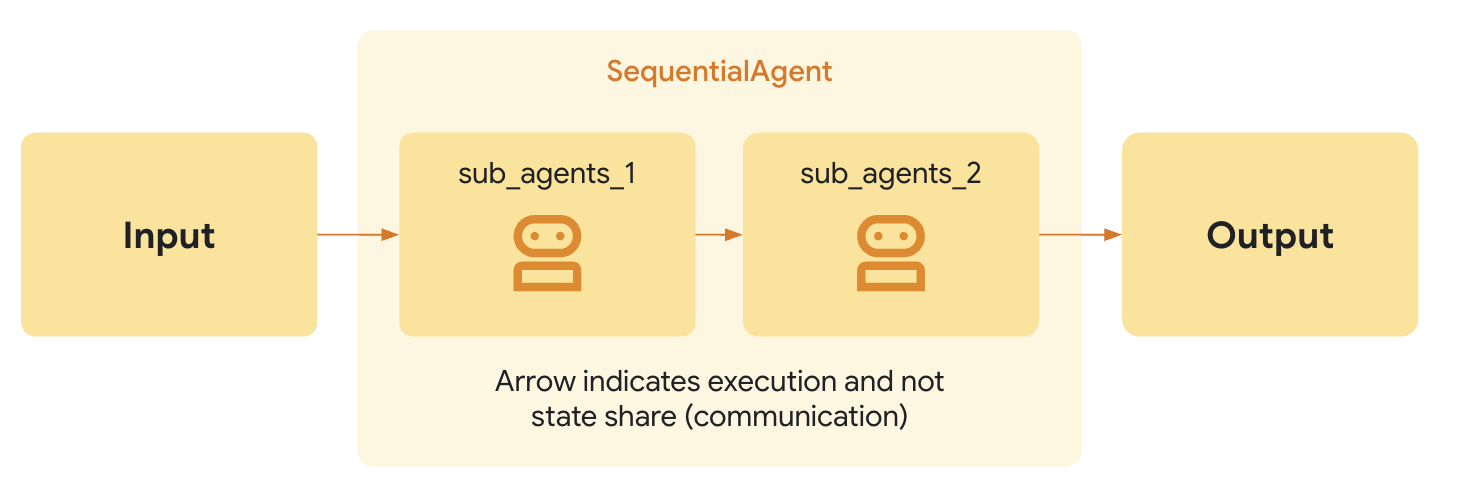
Best used for:
- Rigid data pipelines
- ETL tasks (extract, transform, load)
- Anything that follows a known path
Code Example:
import {
  FunctionTool,
  LlmAgent,
  SequentialAgent,
  Runner,
  InMemorySessionService,
  isFinalResponse,
} from '@google/adk';
import { Content } from '@google/genai';
import { z } from 'zod';

// ─── 1. Define Tools ──────────────────────────────────────────────────────────

const extractData = new FunctionTool({
  name: 'extract_data',
  description: 'Extracts raw data from input text.',
  parameters: z.object({
    input_text: z.string().describe('The text to extract data from.'),
  }),
  execute: ({ input_text }) => {
    return { result: input_text.toUpperCase() };
  },
});

const cleanData = new FunctionTool({
  name: 'clean_data',
  description: 'Cleans the provided data.',
  parameters: z.object({
    data: z.string().describe('The data to clean.'),
  }),
  execute: ({ data }) => {
    return { result: data.trim() };
  },
});

// ─── 2. Create Individual Agents ──────────────────────────────────────────────

const extractAgent = new LlmAgent({
  name: 'extract_agent',
  model: 'gemini-2.0-flash',
  tools: [extractData],
  instruction:
    'You are a data extraction agent. ' +
    'When given the user message as `input_text`, ' +
    'call the extract_data tool and return *only* its output.',
  description: 'Extracts data from input',
  outputKey: 'raw_data', // saves output to session state
});

const cleanAgent = new LlmAgent({
  name: 'clean_agent',
  model: 'gemini-2.0-flash',
  tools: [cleanData],
  instruction:
    'You are a data cleaning agent. ' +
    'Take the extracted data in `{raw_data}`, ' +
    'call the clean_data tool with it, and return *only* the cleaned data.',
  description: 'Cleans extracted data',
});

// ─── 3. Create Sequential Agent ───────────────────────────────────────────────

const sequentialAgent = new SequentialAgent({
  name: 'sequential_pipeline',
  subAgents: [extractAgent, cleanAgent], // camelCase vs Python's sub_agents
  description: 'Runs extract_agent then clean_agent, in order.',
});

// ─── 4. Setup Session + Runner ────────────────────────────────────────────────

const APP_NAME   = 'sequential_app';
const USER_ID    = 'user_123';
const SESSION_ID = 'session_456';

const sessionService = new InMemorySessionService();

await sessionService.createSession({
  appName: APP_NAME,
  userId: USER_ID,
  sessionId: SESSION_ID,
});

const runner = new Runner({
  agent: sequentialAgent,
  appName: APP_NAME,
  sessionService,
});

// ─── 5. Run the Sequential Agent ─────────────────────────────────────────────

async function runSequentialAgent(inputText: string): Promise<string> {
  const newMessage: Content = {
    role: 'user',
    parts: [{ text: inputText }],
  };

  for await (const event of runner.runAsync({
    userId: USER_ID,
    sessionId: SESSION_ID,
    newMessage,
  })) {
    if (isFinalResponse(event)) {
      return event.content?.parts?.[0]?.text ?? 'No text in response.';
    }
  }

  return 'No response received.';
}

// ─── 6. Example Usage ─────────────────────────────────────────────────────────

const result = await runSequentialAgent('start');
console.log(result);
3. ParallelAgent
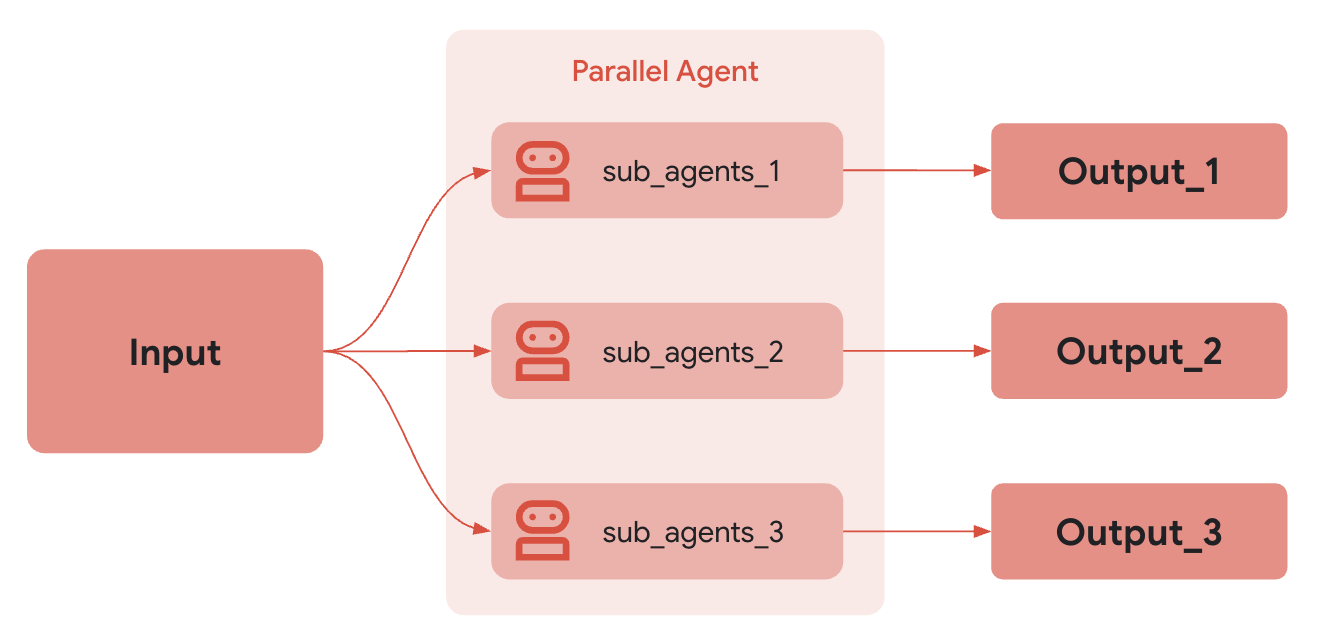
A ParallelAgent runs multiple tools concurrently through async I/O and returns their results as a batch. While this provides a performance boost for I/O-bound operations, note that this is not necessarily multi-threaded parallelism. This is useful when:
- Tasks are independent of each other
- You want to speed up workflows
- You’re aggregating results (e.g., fetching from multiple APIs)
Code Examples
import {
  FunctionTool,
  LlmAgent,
  ParallelAgent,
  Runner,
  InMemorySessionService,
} from '@google/adk';
import { Content } from '@google/genai';
import { z } from 'zod';

// ─── 1. Define Tools ──────────────────────────────────────────────────────────

const getWeather = new FunctionTool({
  name: 'get_weather',
  description: 'Gets the current weather for a city.',
  parameters: z.object({
    city: z.string().describe('The name of the city to get weather for.'),
  }),
  execute: ({ city }) => {
    return { result: `The weather in ${city} is sunny.` };
  },
});

const getNews = new FunctionTool({
  name: 'get_news',
  description: 'Gets the latest news on a topic.',
  parameters: z.object({
    topic: z.string().describe('The topic to get news about.'),
  }),
  execute: ({ topic }) => {
    return { result: `Latest news about ${topic}: Everything is great!` };
  },
});

// ─── 2. Create Individual Agents ──────────────────────────────────────────────

const weatherAgent = new LlmAgent({
  name: 'weather_agent',
  model: 'gemini-2.0-flash',
  tools: [getWeather],
  instruction:
    'Extract the city name from the user query, call get_weather tool, ' +
    'and return only that result.',
  description: 'Provides weather information',
  outputKey: 'weather_info', // saves result to session state
});

const newsAgent = new LlmAgent({
  name: 'news_agent',
  model: 'gemini-2.0-flash',
  tools: [getNews],
  instruction:
    'Extract the topic from the user query, call get_news tool, ' +
    'and return only that result.',
  description: 'Provides news updates',
  outputKey: 'news_info', // saves result to session state
});

// ─── 3. Create Parallel Agent ─────────────────────────────────────────────────

const parallelAgent = new ParallelAgent({
  name: 'parallel_fetcher',
  subAgents: [weatherAgent, newsAgent], // both run concurrently
  description: 'Fetch weather & news at the same time',
});

// ─── 4. Setup Session + Runner ────────────────────────────────────────────────

const APP_NAME   = 'parallel_app';
const USER_ID    = 'user_123';
const SESSION_ID = 'session_456';

const sessionService = new InMemorySessionService();

await sessionService.createSession({
  appName: APP_NAME,
  userId: USER_ID,
  sessionId: SESSION_ID,
});

const runner = new Runner({
  agent: parallelAgent,
  appName: APP_NAME,
  sessionService,
});

// ─── 5. Run the Parallel Agent ────────────────────────────────────────────────

// Note: unlike Sequential/single agents, ParallelAgent emits multiple
// content events (one per sub-agent), so we collect ALL of them
// instead of only grabbing the final response.

async function runParallelAgent(query: string): Promise<string[]> {
  const newMessage: Content = {
    role: 'user',
    parts: [{ text: query }],
  };

  const replies: string[] = [];

  for await (const event of runner.runAsync({
    userId: USER_ID,
    sessionId: SESSION_ID,
    newMessage,
  })) {
    // Collect any event that has text content
    const text = event.content?.parts?.[0]?.text;
    if (text) {
      replies.push(text);
    }
  }

  return replies;
}

// ─── 6. Example Usage ─────────────────────────────────────────────────────────

const result = await runParallelAgent('Berlin');
console.log(result);
4. LoopAgent
A LoopAgent repeats a specific tool or agent until a condition is met. It’s essentially a control structure – like a while loop – that enables iterative refinement or repeated querying.
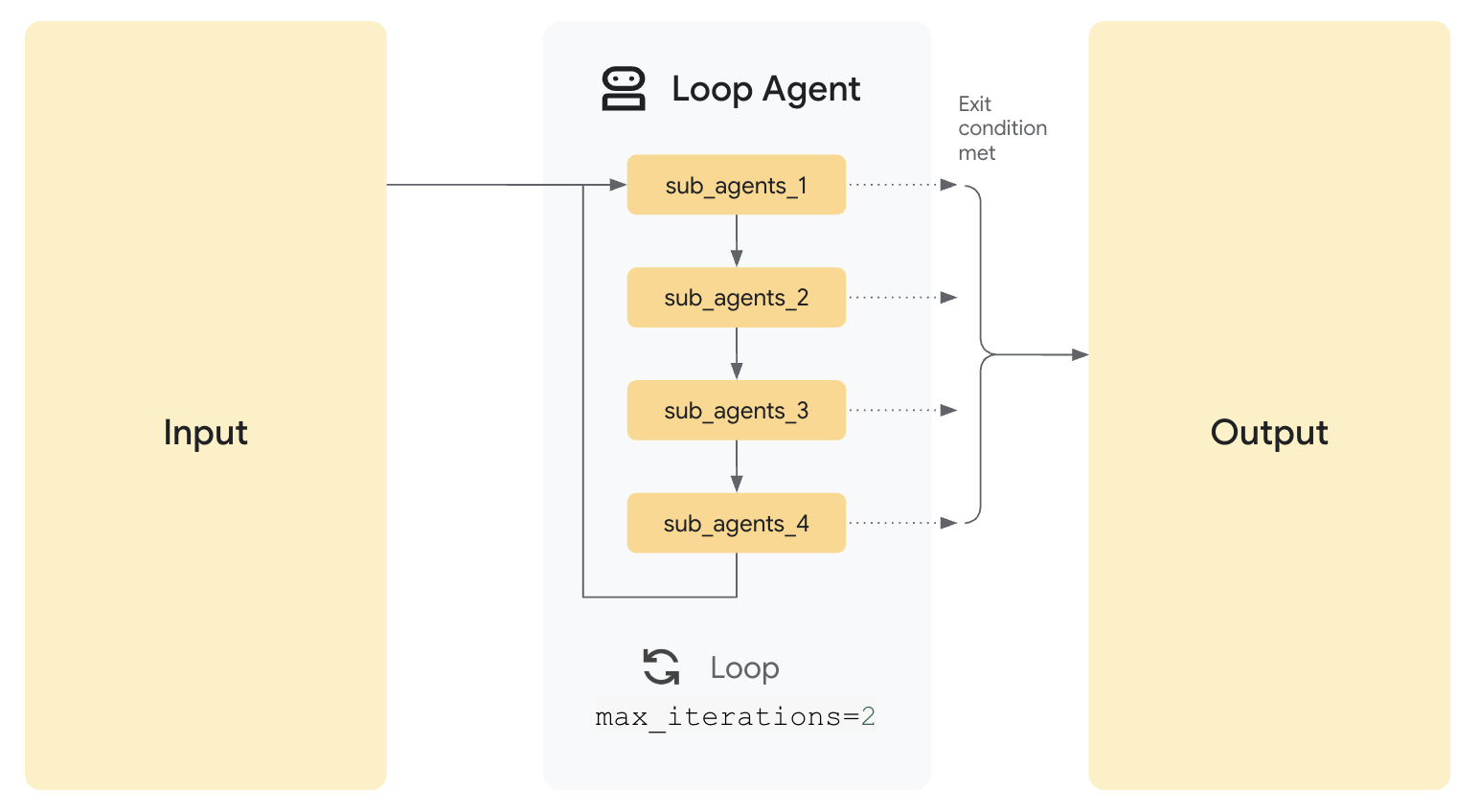
Great for:
- Searching and summarizing
- Multi-step reasoning until success
- Self-checking agents
Code Example:
import {
  FunctionTool,
  LlmAgent,
  LoopAgent,
  BaseAgent,
  Runner,
  InMemorySessionService,
  InvocationContext,
  isFinalResponse,
  createEvent,
  createEventActions,
} from '@google/adk';
import type { Event } from '@google/adk';
import { Content } from '@google/genai';
import { z } from 'zod';

// ─── 1. Define Tool ───────────────────────────────────────────────────────────

const guessNumber = new FunctionTool({
  name: 'guess_number',
  description: 'Makes a guess at the target number.',
  parameters: z.object({
    input_text: z.string().describe('Context for the guess.'),
  }),
  execute: ({ input_text }) => {
    // Mock logic — always guesses 42
    return { result: 'Is it 42?' };
  },
});

// ─── 2. Create Guesser Agent ──────────────────────────────────────────────────

const guessAgent = new LlmAgent({
  name: 'guesser',
  model: 'gemini-2.0-flash',
  description: 'Makes a guess at the target number.',
  instruction:
    'You are a number-guessing agent. On each turn, ' +
    'call the guess_number tool and return *only* its output.',
  tools: [guessNumber],
  outputKey: 'last_response', // saves guess to session state
});

// ─── 3. Create Custom Checker Agent ───────────────────────────────────────────


class CheckerAgent extends BaseAgent {
  constructor(name: string) {
    super({ name, description: 'Checks if the guessed number is correct.' });
  }

  // Called every loop iteration after guessAgent runs
  async *runAsyncImpl(ctx: InvocationContext): AsyncGenerator<Event> {
    // Read last guess from shared session state (set by guessAgent's outputKey)
    const last = (ctx.session.state['last_response'] as string) ?? '';

    // Stop looping if "42" was found in the response
    const found = last.includes('42');

    // escalate: true → tells LoopAgent to STOP iterating
    // escalate: false → LoopAgent continues to next iteration
    yield createEvent({
      author: this.name,
      content: {
        role: 'assistant',
        parts: [{ text: found ? 'stop' : 'continue' }],
      } as Content,
      actions: createEventActions({ escalate: found }),
    });
  }

  // Required by the BaseAgent interface (for live/streaming mode)
  async *runLiveImpl(ctx: InvocationContext): AsyncGenerator<Event> {
    yield createEvent({ author: this.name });
  }
}

const checkerAgent = new CheckerAgent('checker');

// ─── 4. Create Loop Agent ─────────────────────────────────────────────────────

const loopAgent = new LoopAgent({
  name: 'guessing_loop',
  subAgents: [guessAgent, checkerAgent], // runs in order each iteration
  maxIterations: 5,                       // hard cap: stop after 5 rounds
  description: 'Repeatedly guesses a number until correct or max iterations reached',
});

// ─── 5. Setup Session + Runner ────────────────────────────────────────────────

const APP_NAME   = 'loop_app';
const USER_ID    = 'user_123';
const SESSION_ID = 'session_456';

const sessionService = new InMemorySessionService();

await sessionService.createSession({
  appName: APP_NAME,
  userId: USER_ID,
  sessionId: SESSION_ID,
});

const runner = new Runner({
  agent: loopAgent,
  appName: APP_NAME,
  sessionService,
});

// ─── 6. Run the Loop Agent ────────────────────────────────────────────────────

async function runLoopAgent(query: string): Promise<string> {
  const newMessage: Content = {
    role: 'user',
    parts: [{ text: query }],
  };

  for await (const event of runner.runAsync({
    userId: USER_ID,
    sessionId: SESSION_ID,
    newMessage,
  })) {
    if (isFinalResponse(event)) {
      return event.content?.parts?.[0]?.text ?? 'No text in response.';
    }
  }

  return 'No response received.';
}

// ─── 7. Example Usage ─────────────────────────────────────────────────────────

const result = await runLoopAgent('Start guessing');
console.log(result);
How the loop works
Iteration 1:
  guessAgent  → calls guess_number() → "Is it 42?" → saved to state.last_response
  checkerAgent → reads state.last_response → "42" found! → escalate: true → STOP

If 42 wasn't found:
  escalate: false → LoopAgent runs another iteration (up to maxIterations: 5)
5. Nested Agents (Agent-as-a-Tool)
In ADK you can threat an entire agent as a tool. this means one agent can call another agent as part of its workflow. This is particularly powerful for:
- Decomposing tasks into sub-agents
- Creating reusable building blocks
- Building hierarchical systems
Code Example:
import {
  LlmAgent,
  AgentTool,       // imported directly from '@google/adk' (no sub-path needed)
  Runner,
  InMemorySessionService,
  isFinalResponse,
} from '@google/adk';
import { Content } from '@google/genai';

// ─── 1. Create Sub-Agent (the specialist) ────────────────────────────────────

const subAgent = new LlmAgent({
  name: 'specialized_agent',
  model: 'gemini-2.0-flash',
  description: 'A specialized agent with specific capabilities',
  instruction:
    'You are the specialized agent. Take the user\'s request string ' +
    'and return exactly: "Specialized result: <their request>".',
});

// ─── 2. Wrap Sub-Agent as a Tool ──────────────────────────────────────────────

// Python: AgentTool(agent=sub_agent)
// TypeScript: new AgentTool({ agent: subAgent })
// The AgentTool makes the entire sub-agent callable like a regular function tool

const nestedTool = new AgentTool({ agent: subAgent });

// ─── 3. Create Supervisor Agent ───────────────────────────────────────────────

const superAgent = new LlmAgent({
  name: 'supervisor',
  model: 'gemini-2.0-flash',
  tools: [nestedTool],               // sub-agent is used as a tool here
  outputKey: 'delegated_response',   // saves final result to session state
  description: "Delegates the user's request to a specialist and returns the result.",
  instruction:
    'You are the supervisor. When the user gives you a request, ' +
    'call the specialized_agent tool and return *only* what that tool returns.',
});

// ─── 4. Setup Session + Runner ────────────────────────────────────────────────

const APP_NAME   = 'delegation_app';
const USER_ID    = 'user_123';
const SESSION_ID = 'session_456';

const sessionService = new InMemorySessionService();

await sessionService.createSession({
  appName: APP_NAME,
  userId: USER_ID,
  sessionId: SESSION_ID,
});

const runner = new Runner({
  agent: superAgent,
  appName: APP_NAME,
  sessionService,
});

// ─── 5. Run the Supervisor ────────────────────────────────────────────────────

async function runSupervisor(query: string): Promise<string> {
  const newMessage: Content = {
    role: 'user',
    parts: [{ text: query }],
  };

  for await (const event of runner.runAsync({
    userId: USER_ID,
    sessionId: SESSION_ID,
    newMessage,
  })) {
    if (isFinalResponse(event)) {
      return event.content?.parts?.[0]?.text ?? 'No text in response.';
    }
  }

  return 'No response received.';
}

// ─── 6. Example Usage ─────────────────────────────────────────────────────────

const response = await runSupervisor('Please transform this text');
console.log(response);
Tools in ADK: Building Block of Agent Behavior
Agents may make decisions and plan workflows, but they can’t do anything useful without tools. In ADK, a tool is a wrapper around a function or capability that the agent can call to take real-world actions — like retrieving information, processing data, sending messages, or even invoking another agent.
Think of tools as the “hands” of your agent: they do the actual work, while the agent decides what to do and when.
What Is a Tool in ADK?
A tool in ADK is a standardized TypeScript object that contains:
- A name: how the agent refers to it
- A function: the callable logic that performs the action
- An optional description: Used by LLM agents to decide which tool to use
- Optionally: Input/output schemas(defined with
zod) to validate input or improve prompting
This abstraction makes it possible for agents to use tools interchangeably, even if they were built by different developers or perform wildly different tasks.
In TypeScript, tools are typically created using the FunctionTool class from @google/adk, with parameter schemas defined using the zod library:
import { FunctionTool } from '@google/adk';
import { z } from 'zod';

const myTool = new FunctionTool({
  name: 'my_tool',                         // how the agent refers to it
  description: 'Does something useful.',   // helps the LLM decide when to use it
  parameters: z.object({                   // zod schema validates inputs
    input: z.string().describe('The input to process.'),
  }),
  execute: ({ input }) => {                // the callable logic
    return { result: `Processed: ${input}` };
  },
});
1. Creating a Basic Tool
Let’s start with the simplest use case: Defining a python function to use as a tool
import { FunctionTool, LlmAgent, Runner, InMemorySessionService, isFinalResponse } from '@google/adk';
import { Content } from '@google/genai';
import { z } from 'zod';

const greetUser = new FunctionTool({
  name: 'greet_user',
  description: 'Greets the user by name.',
  parameters: z.object({
    name: z.string().describe('The name of the user to greet.'),
  }),
  execute: ({ name }) => {
    return { result: `Hello, ${name}!` };
  },
});

const greetingAgent = new LlmAgent({
  name: 'greeter',
  model: 'gemini-2.0-flash',
  tools: [greetUser],
  description: 'Agent that can greet users',
});

const APP_NAME   = 'greeting_app';
const USER_ID    = 'user_123';
const SESSION_ID = 'session_456';

const sessionService = new InMemorySessionService();
await sessionService.createSession({ appName: APP_NAME, userId: USER_ID, sessionId: SESSION_ID });

const runner = new Runner({ agent: greetingAgent, appName: APP_NAME, sessionService });

async function runGreetingAgent(query: string): Promise<string> {
  const newMessage: Content = { role: 'user', parts: [{ text: query }] };
  for await (const event of runner.runAsync({ userId: USER_ID, sessionId: SESSION_ID, newMessage })) {
    if (isFinalResponse(event)) return event.content?.parts?.[0]?.text ?? 'No text in response.';
  }
  return 'No response received.';
}

const response = await runGreetingAgent('Say hello to Alice');
console.log(response);
2. Adding Tool Context Access
For more advanced scenarios, ADK allows tools to access contextual information using the special ToolContext parameter.
import {
  FunctionTool,
  LlmAgent,
  Runner,
  InMemorySessionService,
  isFinalResponse,
  ToolContext,
} from '@google/adk';
import { Content } from '@google/genai';
import { z } from 'zod';

// Tool with context access
// Unlike Python where tool_context is injected via a special param name,
// in TypeScript it is passed as the second argument to execute()
const processDocument = new FunctionTool({
  name: 'process_document',
  description: 'Analyzes a document using context from memory.',
  parameters: z.object({
    document_name: z.string().describe('Name of the document to analyze.'),
    analysis_query: z.string().describe('The specific analysis to perform.'),
  }),
  execute: ({ document_name, analysis_query }, toolContext: ToolContext) => {
    // Access session state
    const previousQueries: string[] = (toolContext.state?.['previous_queries'] as string[]) ?? [];

    // Update state with the new query via stateDelta
    toolContext.actions.stateDelta = {
      previous_queries: [...previousQueries, analysis_query],
    };

    return {
      status: 'success',
      analysis: `Analysis of '${document_name}' regarding '${analysis_query}'`,
    };
  },
});

const documentAgent = new LlmAgent({
  name: 'document_analyzer',
  model: 'gemini-2.0-flash',
  outputKey: 'analysis_result',
  tools: [processDocument],
  description: 'Analyzes a document and records each query in history.',
  instruction:
    'You are a document analysis agent. When the user asks ' +
    "'Analyze <document_name> for <analysis_query>', extract both parts, " +
    'call process_document tool, and return *only* the resulting JSON.',
});

const APP_NAME   = 'document_app';
const USER_ID    = 'user_123';
const SESSION_ID = 'session_456';

const sessionService = new InMemorySessionService();
await sessionService.createSession({ appName: APP_NAME, userId: USER_ID, sessionId: SESSION_ID });

const runner = new Runner({ agent: documentAgent, appName: APP_NAME, sessionService });

async function runDocumentAgent(query: string): Promise<string> {
  const newMessage: Content = { role: 'user', parts: [{ text: query }] };
  for await (const event of runner.runAsync({ userId: USER_ID, sessionId: SESSION_ID, newMessage })) {
    if (isFinalResponse(event)) return event.content?.parts?.[0]?.text ?? 'No text in response.';
  }
  return 'No response received.';
}

const response = await runDocumentAgent('Analyze report.pdf for sales trends');
console.log(response);
Tool Composition: Tools That Use Other Tools
You can create tools that call other tools, enabling more complex behaviors:
import { FunctionTool, LlmAgent, Runner, InMemorySessionService, isFinalResponse } from '@google/adk';
import { Content } from '@google/genai';
import { z } from 'zod';

// Basic helper — plain TypeScript function, not an ADK tool itself
// It's called internally by analyzeData, not exposed to the agent directly
function getData(source: string): string {
  return `Raw data from ${source}: 42, 17, 23, 8, 15`;
}

// Composite ADK tool that calls getData() internally
const analyzeData = new FunctionTool({
  name: 'analyze_data',
  description: 'Analyzes data from a specified source.',
  parameters: z.object({
    source: z.string().describe('The name or URL of the data source.'),
  }),
  execute: ({ source }) => {
    // Call the plain helper internally
    const rawData = getData(source);
    const numbers = rawData
      .split(':', 2)[1]
      .split(',')
      .map((n) => parseInt(n.trim(), 10));
    const total = numbers.reduce((a, b) => a + b, 0);
    const average = total / numbers.length;
    return {
      result: `Analysis of ${source}:\n- Total: ${total}\n- Average: ${average.toFixed(2)}`,
    };
  },
});

const dataAgent = new LlmAgent({
  name: 'data_analyzer',
  model: 'gemini-2.0-flash',
  tools: [analyzeData],
  outputKey: 'analysis_summary',
  description: 'Fetches raw data and returns its analysis.',
  instruction:
    "You are the data analyzer. When the user says " +
    "'Analyze data from <source>', extract the <source> string, " +
    'call the analyze_data tool, and return *only* its output.',
});

const APP_NAME   = 'data_app';
const USER_ID    = 'user_123';
const SESSION_ID = 'session_456';

const sessionService = new InMemorySessionService();
await sessionService.createSession({ appName: APP_NAME, userId: USER_ID, sessionId: SESSION_ID });

const runner = new Runner({ agent: dataAgent, appName: APP_NAME, sessionService });

async function runDataAgent(query: string): Promise<string> {
  const newMessage: Content = { role: 'user', parts: [{ text: query }] };
  for await (const event of runner.runAsync({ userId: USER_ID, sessionId: SESSION_ID, newMessage })) {
    if (isFinalResponse(event)) return event.content?.parts?.[0]?.text ?? 'No text in response.';
  }
  return 'No response received.';
}

const response = await runDataAgent('Analyze data from database_alpha');
console.log(response);
Creating and Using Tools
When defining a FunctionTool in TypeScript, how you define it significantly impacts the agent’s ability to use it correctly. The LLM relies heavily on the tool’s name, parameters schema, and description to understand its purpose and generate the correct call.
Unlike Python where you can pass plain functions directly to the tools list and ADK auto-wraps them, in TypeScript you always wrap tools explicitly using FunctionTool with a zod schema. The framework uses this schema to validate inputs and generate the correct prompt context for the LLM.
import {
  FunctionTool,
  LlmAgent,
  SequentialAgent,
  Runner,
  InMemorySessionService,
  isFinalResponse,
} from '@google/adk';
import { Content } from '@google/genai';
import { z } from 'zod';

// ─── Define Tool Functions ────────────────────────────────────────────────────

const extract = new FunctionTool({
  name: 'extract',
  description: 'Extracts data from input.',
  parameters: z.object({
    input_text: z.string().describe('The raw input text to extract from.'),
  }),
  execute: ({ input_text }) => ({ result: 'Extracted: ' + input_text }),
});

const clean = new FunctionTool({
  name: 'clean',
  description: 'Cleans and processes the data.',
  parameters: z.object({
    data: z.string().describe('The data to clean.'),
  }),
  execute: ({ data }) => ({ result: data.trim() }),
});

const summarize = new FunctionTool({
  name: 'summarize',
  description: 'Summarizes the provided data.',
  parameters: z.object({
    data: z.string().describe('The data to summarize.'),
  }),
  execute: ({ data }) => ({ result: `Summary of: ${data}` }),
});

// ─── Create Individual Agents ─────────────────────────────────────────────────

const extractAgent = new LlmAgent({
  name: 'extractor',
  model: 'gemini-2.0-flash',
  tools: [extract],
  outputKey: 'extracted_data',
  description: "Extracts raw data from the user's input.",
  instruction:
    "You are the extractor. Given the user's message as `input_text`, " +
    'call the extract tool and return *only* its output.',
});

const cleanAgent = new LlmAgent({
  name: 'cleaner',
  model: 'gemini-2.0-flash',
  tools: [clean],
  outputKey: 'cleaned_data',
  description: 'Cleans the extracted data.',
  instruction:
    'You are the cleaner. Take the extracted data in `{extracted_data}`, ' +
    'call the clean tool, and return *only* the cleaned result.',
});

const summarizeAgent = new LlmAgent({
  name: 'summarizer',
  model: 'gemini-2.0-flash',
  tools: [summarize],
  outputKey: 'final_summary',
  description: 'Summarizes the cleaned data.',
  instruction:
    'You are the summarizer. Take the cleaned data in `{cleaned_data}`, ' +
    'call the summarize tool, and return *only* the summary.',
});

// ─── Create Sequential Pipeline ───────────────────────────────────────────────

const pipeline = new SequentialAgent({
  name: 'data_pipeline',
  subAgents: [extractAgent, cleanAgent, summarizeAgent],
  description: 'Processes data in three steps: extract, clean, summarize',
});

// For ADK tools compatibility, the root agent must be exported as rootAgent
export const rootAgent = pipeline;

// ─── Setup Session + Runner ───────────────────────────────────────────────────

const APP_NAME   = 'pipeline_app';
const USER_ID    = 'user_123';
const SESSION_ID = 'session_456';

const sessionService = new InMemorySessionService();
await sessionService.createSession({ appName: APP_NAME, userId: USER_ID, sessionId: SESSION_ID });

const runner = new Runner({ agent: rootAgent, appName: APP_NAME, sessionService });

// ─── Run the Pipeline ─────────────────────────────────────────────────────────

async function runPipeline(inputText: string): Promise<string> {
  const newMessage: Content = { role: 'user', parts: [{ text: inputText }] };
  let finalResponse = 'No response received.';

  for await (const event of runner.runAsync({ userId: USER_ID, sessionId: SESSION_ID, newMessage })) {
    // Check for intermediate state changes (useful for debugging)
    if (event.actions?.stateDelta) {
      console.log('State update:', event.actions.stateDelta);
    }
    if (isFinalResponse(event)) {
      finalResponse = event.content?.parts?.[0]?.text ?? 'No text in response.';
    }
  }

  return finalResponse;
}

// ─── Example Usage ────────────────────────────────────────────────────────────

const result = await runPipeline('This is some sample input data.');
console.log(result)
Let understand how to do Orchestrate multiple A.gents.