WordPress themes often include options for customization, allowing users to tailor their site’s appearance and functionality. The customize_register action hook in WordPress enables developers to add custom controls and settings to the theme customizer, providing a user-friendly interface for making changes.
In this guide, we’ll explore how to use customize_register to add various options, such as text inputs, text areas, checkboxes, radio buttons, dropdown selects, and image uploads, and then display these settings using shortcodes within the theme.
Setting Up customize_register Function
The customize_register function is where all the customization settings are defined. Below is an example of how this function can be utilized:
// Function to add custom settings to theme customizer
function my_theme_custom_register($wp_customize) {
    // Add a section
    // Add settings and controls for text, textarea, checkbox, radio, select, and image
    // ...
}
add_action('customize_register', 'my_theme_custom_register');
Displaying values set in customizer using Shortcode
// Shortcode to display text input value
function text_input_shortcode() {
    $text_input_value = get_theme_mod('custom_theme_option_name', '');
    return '<p>Text: ' . esc_html($text_input_value) . '</p>';
}
add_shortcode('text_input', 'text_input_shortcode');
Use shortcode code method to display the value
// Complete code
<?php

function my_theme_custom_register($wp_customize) {
    //Add a section
    $wp_customize->add_section('custom_theme_options', array(
        'title' => __('Admin Personal Details', 'text-domain'),
        'priority' => 200,
    ));

    //Add a setting for text
    $wp_customize->add_setting('custom_theme_option_name', array(
        'default' => 'Chethan S Poojary',
        'sanitize_callback' => 'sanitize_text_field',
    ));

    //Add a control for text the settings
    $wp_customize->add_control('custom_theme_option_name', array(
        'label' => __('Enter Your Name', 'text-domian'),
        'section' => 'custom_theme_options',
        'type' => 'text',
        'priority' => 10,
    ));

    // Textarea Input Settings and Control
    $wp_customize->add_setting('textarea_setting', array(
        'default' => '',
        'sanitize_callback' => 'sanitize_textarea_field',
    ));

    $wp_customize->add_control('textarea_control', array(
        'label'    => __('Textarea Input', 'text-domain'),
        'section'  => 'custom_theme_options',
        'type'     => 'textarea',
        'settings' => 'textarea_setting',
        'priority' => 20,
    ));

    // Checkbox Setting and Control
    $wp_customize->add_setting('checkbox_setting', array(
        'default' => false,
    ));

    $wp_customize->add_control('checkbox_control', array(
        'label'    => __('Check if ture', 'text-domain'),
        'section'  => 'custom_theme_options',
        'type'     => 'checkbox',
        'settings' => 'checkbox_setting',
        'priority' => 30,
    ));

    // Radio Buttons Setting and Control
    $wp_customize->add_setting('radio_setting', array(
        'default'           => 'option1',
    ));

    $wp_customize->add_control('radio_control', array(
        'label'    => __('Radio Buttons', 'text-domain'),
        'section'  => 'custom_theme_options',
        'type'     => 'radio',
        'choices'  => array(
            'option1' => __('Option One', 'text-domain'),
            'option2' => __('Option Two', 'text-domain'),
        ),
        'settings' => 'radio_setting',
        'priority' => 40,
    ));

    // Dropdown Select Setting and Control
    $wp_customize->add_setting('select_setting', array(
        'default'           => 'option1',
    ));

    $wp_customize->add_control('select_control', array(
        'label'    => __('Dropdown Select', 'text-domain'),
        'section'  => 'custom_theme_options',
        'type'     => 'select',
        'choices'  => array(
            'option1' => __('Option 1', 'text-domain'),
            'option2' => __('Option 2', 'text-domain'),
        ),
        'settings' => 'select_setting',
        'priority' => 50,
    ));

    // Image Upload Setting and Control
    $wp_customize->add_setting('image_setting', array(
        'default' => '', // Change to appropriate callback for image sanitization
    ));

    $wp_customize->add_control(new WP_Customize_Image_Control($wp_customize, 'image_control', array(
        'label'    => __('Image Upload', 'text-domain'),
        'section'  => 'custom_theme_options',
        'settings' => 'image_setting',
        'priority' => 60,
    )));
}

add_action('customize_register', 'my_theme_custom_register');

// Shortcode to display text input value
function text_input_shortcode() {
    $text_input_value = get_theme_mod('custom_theme_option_name', '');
    return '<p>Text: ' . esc_html($text_input_value) . '</p>';
}
add_shortcode('text_input', 'text_input_shortcode');

// Shortcode to display textarea value
function textarea_shortcode() {
    $textarea_value = get_theme_mod('textarea_setting', '');
    return '<p>Text Area: ' . esc_html($textarea_value) . '</p>';
}
add_shortcode('textarea', 'textarea_shortcode');

// Shortcode to display checkbox value
function checkbox_shortcode() {
    $checkbox_value = get_theme_mod('checkbox_setting', false);
    return '<p>Check Box: ' . ($checkbox_value ? 'Checked' : 'Unchecked') . '</p>';
}
add_shortcode('checkbox', 'checkbox_shortcode');

// Shortcode to display radio button value
function radio_shortcode() {
    $radio_value = get_theme_mod('radio_setting', 'option1');
    return '<p> Radio Buttion: ' . esc_html($radio_value) . '</p>';
}
add_shortcode('radio', 'radio_shortcode');

// Shortcode to display select value
function select_shortcode() {
    $select_value = get_theme_mod('select_setting', '');
    return '<p> Select Box: ' . esc_html($select_value) . '</p>';
}
add_shortcode('select', 'select_shortcode');

// Shortcode to display image value
function image_shortcode() {
    $image_value = get_theme_mod('image_setting', '');
    if ($image_value) {
        return '<div>Image : </div><img src="' . esc_url($image_value) . '" alt="Uploaded Image">';
    } else {
        return '<p>No image uploaded.</p>';
    }
}
add_shortcode('image', 'image_shortcode');
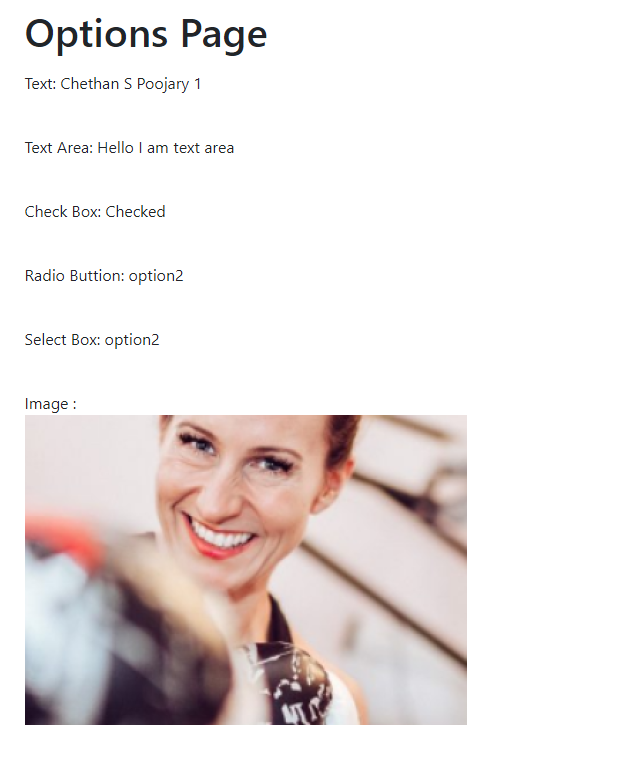
[text_input]will display the text input value.[textarea]will display the textarea value.[checkbox]will display the checkbox status.[radio]will display the selected radio button value.[select]will display the selected option from the dropdown.[image]will display the uploaded image.
Result: