When I am working on a project I need to implement a PDF generator. hear how I approach this feature.
- First thing first
- I needed to use a package to generate PDFs. So did my research and found this package for PHP: https://github.com/dompdf/dompdf
- I just added this package to my WordPress child theme and started my work.
- Design I wanted to create:
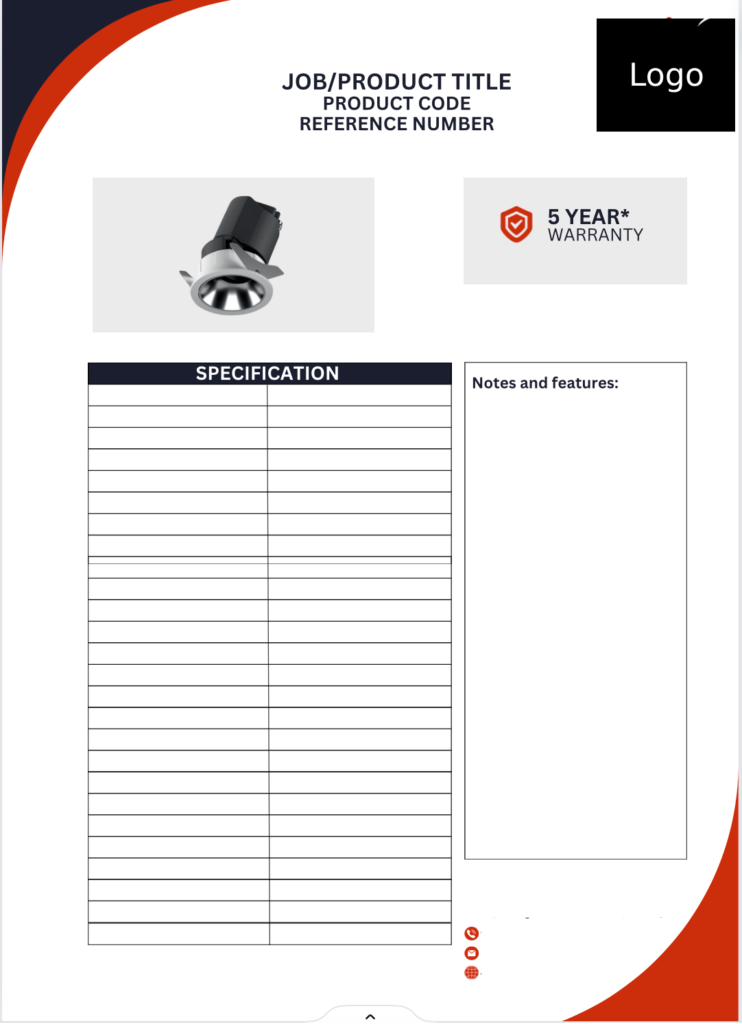
3. Code:
<?php
require 'vendor/autoload.php';

use Dompdf\Dompdf;
use Dompdf\Options;

// Include WordPress functionality
require_once('../../../wp-load.php');

// Retrieve the post ID from the query parameter
$post_id = isset($_GET['post_id']) ? intval($_GET['post_id']) : 0;

// Get post data using the post ID
$post = get_post($post_id);
if (!$post) {
    die('Post not found');
}

// Get the post title and content
$title = $post->post_title;
$content = apply_filters('the_content', $post->post_content);
$featured_image_url = get_the_post_thumbnail_url($post_id, 'full');
$sku =  wc_get_product($post_id)->get_sku();

$extra_notes = get_field('extra_notes', $post_id);

// Initialize specifications tables
$specifications_part1 = '';
$specifications_part2 = '';

// Check if the product has specifications
if (have_rows('product_specification', $post_id)) {
    $specifications_part1 .= '<table>';
    $specifications_part1 .= '<thead><tr><th>Specification</th><th>Value</th></tr></thead><tbody>';

    // Initialize the second part of specifications
    $specifications_part2 = '';

    // Loop through the repeater field rows
    $row_count = 0;
    $assigned_row_count = 12;
    while (have_rows('product_specification', $post_id)) {
        the_row();
        $spec_name = get_sub_field('name');
        $spec_value = get_sub_field('value');

        // Skip the row if either name or value is empty
        if (empty($spec_name) || empty($spec_value)) {
            continue;
        }

        // Add each valid specification to the appropriate table
        if ($row_count < $assigned_row_count) {
            $specifications_part1 .= "<tr><td>{$spec_name}</td><td>{$spec_value}</td></tr>";
        } else {
            // Start the second table only if row_count exceeds 11
            if ($row_count == $assigned_row_count) {
                $specifications_part2 .= '<div class="content extra_fileds "><table><tr><td class="left-column"><div class="spec-table">';
                $specifications_part2 .= '<table>';
                $specifications_part2 .= '<thead><tr><th>Specification</th><th>Value</th></tr></thead><tbody>';
            }

            $specifications_part2 .= "<tr><td>{$spec_name}</td><td>{$spec_value}</td></tr>";
        }

        $row_count++;
    }

    $specifications_part1 .= '</tbody></table>';

    // Close the second table only if it was started
    if ($row_count > $assigned_row_count) {
        $specifications_part2 .= '</tbody></table></td><td class="right-column"><div style="color:#fff;">hello</div></td></tr></table></div>';
    } else {
        $specifications_part2 = ''; // Ensure it stays empty if not needed
    }
} else {
    $specifications_part1 = '<p>No specifications available.</p>';
}

// Use $specifications in your PDF template
// Example: $pdf->writeHTML($specifications);


// Initialize Dompdf with options
$options = new Options();
$options->set('isHtml5ParserEnabled', true);
$options->set('isRemoteEnabled', true); // Enable remote content
$dompdf = new Dompdf($options);

// HTML content for the PDF
$html = '
<!DOCTYPE html>
<html lang="en">
    <head>
        <meta charset="UTF-8">
        <meta name="viewport" content="width=device-width, initial-scale=1.0">
        <title>PDF Template</title>
        <style>
            *{
                margin:0;
                padding:0
            }

            body {
            width: 100%;
            font-family: Arial, sans-serif;
            }

            .header {
            width: 100%;
            }
            .heading_block{
            padding-bottom:50px;
            }
            .heading_block h1{
                font-size:22px;

            }

            .content.part-1,
            .content.part-2{
                width: 100%;
            }

            .content.part-2{
                padding-top:150px;
            }

            .content .product_image img {
                max-width: auto;
                max-height: 200px;
                object-fit: cover;
            }

            .content table {
            width: 100%;
            border-collapse: collapse;
            }

            .content td {
            vertical-align: top;
            padding: margin;
            }

            .content .left-column {
            width: 62%;
            }

            .content.extra_fileds .left-column {
                width: 60%;
            }

            .left-column{
                padding-left:40px;
                padding-right:20px;
            }

            .right-column{
                padding-left:20px;
                padding-right:40px;
            }

            .content .right-column {
            width: 38%;
            }

            .spec-table {
                width: 100%;
                border-collapse: collapse;
            }

            .spec-table th,
            .spec-table td {
            border: 1px solid #000;
            padding: 10px;
            text-align: left;
            font-size: 12px;
            }

            .spec-table th {
            background-color: #f4f4f4;
            font-weight: bold;
            }

            .placeholder-images {
            // margin-top: -220px;
            }

            .placeholder-images table {
            width: 100%;
            border-collapse: collapse;
            }

            .placeholder-images td {
            width: 50%;
            padding: 10px;
            }

            .placeholder-images img {
            width: 100%;
            height: auto;
            }

            .placeholder-images p {
            text-align: center;
            margin-top: 10px;
            font-size: 12px;
            }
            .spec-table .table_heading {
            padding:20px;
            background-color: black;
            color: white;

            }
            .spec-table .table_heading h3 {
            text-align: center;
            font-size: 15px;
            font-weight: bold;
            text-transform: uppercase;
            }

            .empty_boxes {
                padding: 5px 10px 10px 10px;
                border: 1px solid #000000;
                height:430px;
            }


            .empty_boxes h2 {
            font-size: 12px;
            font-weight: bold;
            margin: 0;
            }

            .footer {
            margin-top: 20px;
            }

            .footer img {
            width: auto;
            height: 16px;
            }
            .footer p {
            text-align: left;
            font-size: 12px;
            padding-bottom:10px;
            }

            .footer p span {
            text-align: left;
            font-size: 12px;
            top: -3px;
            left: 3px;
            position: relative;
            }

            .drop_image {
            width: 40px !important;
            height: 40px !important;
            object-fit: contain;
            text-align: start;
            }

            .drop_image_block {
            background-color: #dfdede;
            padding: 4px;
            text-align: start;
            height: 75px;
            }

            .drop_image_block .icon_image {
            width: 50px;
            }

            .image_block_footer {
            position: absolute;
            left: 20%;
            bottom: 0px;
            transform: rotate(180deg);
            }

            * {
            // border: 1px solid black;
            }
        </style>
    </head>
    <body>
        <div class="header" style="display:flex !important; margin-top:50px; width:450px; margin-left:auto;margin-right:auto; ">

            <div class="heading_block">
                <h1  style="text-align: center;">' . htmlspecialchars($title) . '</h1>
                <p style="text-align: center;" class="subtext">PRODUCT CODE: ' . htmlspecialchars($sku) . ' </p>
            </div>

        </div>

        <div class="content part-1">
            <table style="padding-bottom:30px;">
                <tr>
                    <td class="left-column">
                        <div class="product_image">
                            <img src="' . htmlspecialchars($featured_image_url) . '" alt="Featured Image">
                        </div>
                    </td>
                    <td class="right-column">
                        <div class="drop_image_block" style="text-align: center;">
                            <table class="custom-table" align="center" style="margin: auto auto;">
                                <tr valign="middle" style="margin: auto auto; padding-top:20px;">
                                    <td class="cell-1" style="text-align: center; vertical-align: middle;padding-top:10px; padding-left: 5px; width: 50px;">
                                        <img with="50px" src="https://testing.com/wp-content/uploads/2024/09/width_200.webp" alt="WARRANTY" class="icon_image" style="display: block; margin: 0 auto;">
                                    </td>
                                    <td class="cell-2" style="text-align: left; vertical-align: middle;  width: 75px; padding-top:10px;">
                                        <span style="display: block; font-weight: bold;">5 YEAR* </span>
                                        <span style="display: block; font-weight: bold;">WARRANTY</span>
                                    </td>
                                </tr>
                            </table>
                        </div>
                    </td>
                </tr>
            </table>


            <table>
                <tr>
                    <td class="left-column">
                        <div class="spec-table">
                            <div class="table_heading">
                                <h3 class="">Product Specifications</h3>
                            </div>
                            <table>
                            <tbody>
                                    ' . $specifications_part1 . '
                                </tbody>
                            </table>

                        </div>
                    </td>
                    <td class="right-column">

                        <div class="placeholder-images">


                            <div class="empty_boxes">

                                <h2>Notes and features:</h2>
                                ' . $extra_notes . '

                            </div>

                        </div>

                        <div class="footer">
                            <p> Testing LTD | Address</p>
                            <p><img src="https://testing.com/wp-content/uploads/2024/08/footerphoneimage.svg"><span>02070182202</span></p>
                            <p><img src="https://testing.com/wp-content/uploads/2024/08/footeremailicon.svg"><span>info@testing.com</span></p>
                            <p><img style="background-color:#cc2e0d; border-radius:999px;" src="https://testing.com/wp-content/uploads/2024/08/23973555-ed70-4a1c-b8ae-72e57e31a44a.png"><span>www.testing.com</span></p>
                            </div>
                        </div>
                    </td>
                </tr>
            </table>

        </div>
        <div class="content part-2">
        ' . $specifications_part2 . '
        </div>

    </body>
</html>
';

// Load the HTML content into Dompdf
$dompdf->loadHtml($html);

// Set paper size and orientation
$dompdf->setPaper('A4', 'portrait');

// Render the HTML as PDF
$dompdf->render();

$canvas = $dompdf->getCanvas();
$canvas->page_script(function ($pageNumber, $pageCount, $canvas, $fontMetrics) {
    // Header: Add images to the header using the canvas
    $canvas->image('https://test.com/wp-content/uploads/2024/09/Upper-design1.png', 0, 0, 100, 100); // Red Image

    // Add logo instead of text
    $canvas->image('https://test.com/wp-content/uploads/2024/08/Logo-1.png', 495, 20, 75, 75); // Logo image


    // Footer: Add red image to the footer
    $canvas->image('https://test.com/wp-content/uploads/2024/09/Lower-design1.png', 495, 745, 100, 100); // Footer red image

    // Footer with page numbers
    $canvas->text(270, 820, "Page $pageNumber of $pageCount", $fontMetrics->getFont("Arial", "bold"), 10, array(0, 0, 0));

});


// Output the generated PDF (1 = download and 0 = preview)
$dompdf->stream("product_details.pdf", array("Attachment" => 0));